Accessible email signatures for Microsoft 365 and Google Workspace
IT sets one HTML signature, with alt text on the logo, contact lines as real text, and contrast that survives a screen reader, then deploys it so nobody ships their own version.
Opensense is signature management software, not a law firm, and it does not make an organization ADA-compliant. It is how IT stops the signature being the one piece of official email nobody designed.
Trusted by the world's leading brands








What “accessible” means for a signature

ADA Title II covers state and local government. The Department of Justice’s 2024 final rule sets WCAG 2.1 Level AA for web content and mobile apps. Compliance dates are April 26, 2027 for entities of 50,000 people or more and April 26, 2028 for everyone else, after the 2026 extension.

Section 508 requires federal agencies to make the ICT they develop, procure, or use accessible. The Access Board’s standards define “document” to include email messages, so official agency mail and the signature block on it are in scope. Section 508 still incorporates WCAG 2.0 A and AA, not 2.1.

ADA Title III covers businesses open to the public. DOJ’s 2022 web guidance applies the nondiscrimination duty to services offered online, but names no WCAG version and sets no dates. Title II deadlines are not Title III deadlines.

Accessibility of a signature is a template problem, not a training problem. The next paste into Outlook strips the alt text, recolors the title grey on white, and wraps the name in an image.
Who this page is for
Four buyers, three legal postures, one shared problem: official email leaves the building with a signature nobody reviewed.
State and local government
Federal agencies and their contractors
Enterprise IT that already treats WCAG as the bar
Marketing running banner campaigns
What IT actually controls
Opensense does not publish a contrast checker or a WCAG conformance mode, and this page will not pretend otherwise. What it gives you is the HTML and the lock, which is the part employees keep breaking.
Schedule a Demo
One template, not a thousand pastes
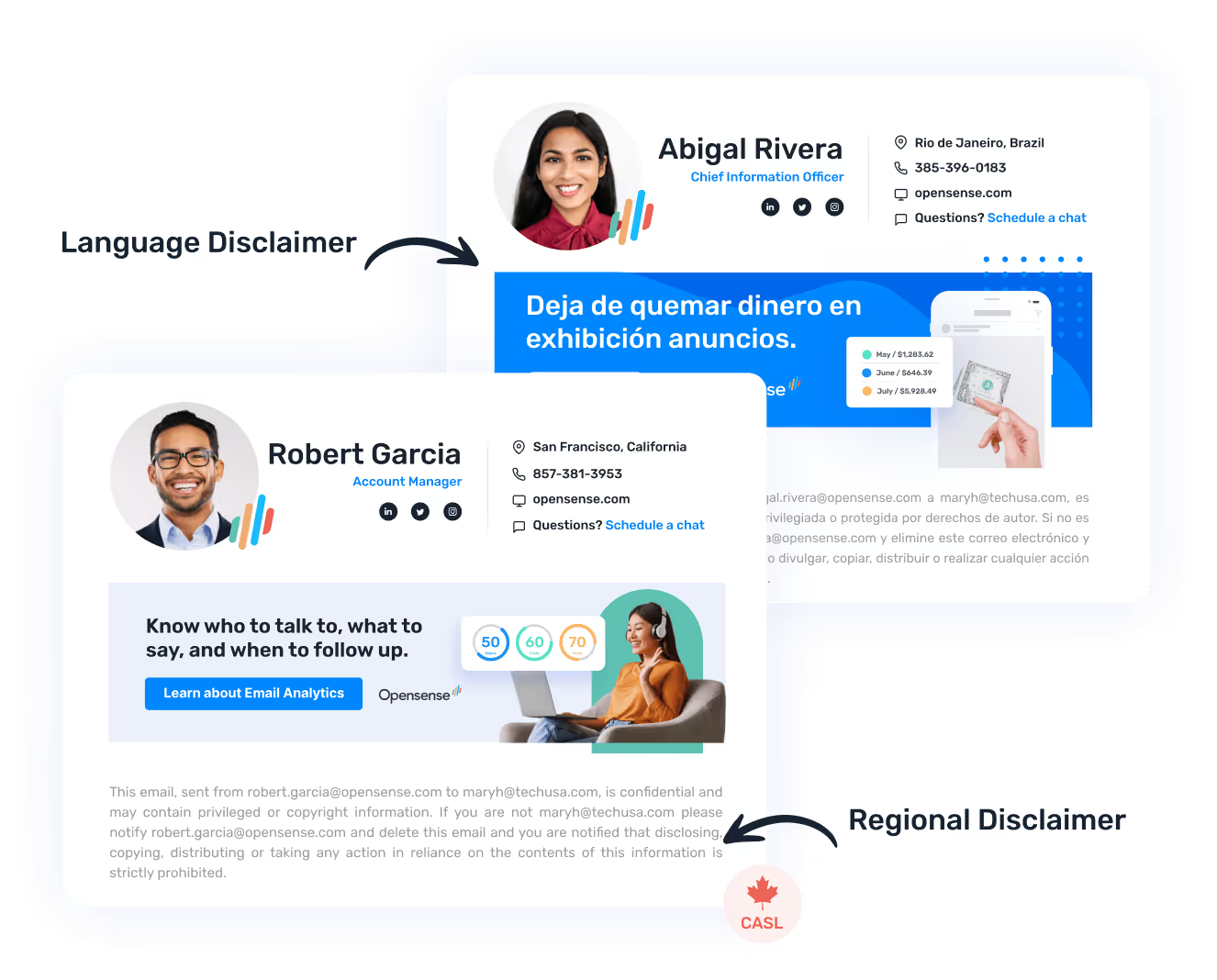
The editor is HTML and CSS, so alt text, real text, and a 4.5:1 color pair are yours to set once.

Directory-backed text
Names, titles and phone numbers come from Entra ID or Google Directory as text, so they stay current and stay readable.

Applied on the way out
Server-side deployment applies the managed block after send, so a signature someone pasted in Outlook does not replace it.

A plain-text block too
Every signature ships an HTML block and a plain-text block, which is the fallback when a client strips the HTML.
What accessible signature HTML looks like
Images and banners
- Alt text that names the brand or states the banner’s message
- Decorative spacers marked alt="" so screen readers skip them
- Static creative rather than a GIF that loops and cannot be paused
Text and contrast
- Name, title, phone and URL as real text, never a picture of text
- Body text at 4.5:1 against its background, large text at 3:1
- Dark Mode Preview in the editor to catch color inversion before rollout
Structure and links
- Link text that states its purpose, not “click here”
- Layout tables that still read name, then title, then phone, then legal
- A plain-text block behind the HTML for clients that strip it

Pricing
Signature is $1 per user per month, Pipeline $3, Complete $5, on a $500 per month platform minimum plus a service plan. There is no accessibility SKU and no accessibility surcharge.
What this page does not claim
Opensense is not ADA-certified, not Section 508-certified, and turning it on does not make an organization conformant. Counsel and your accessibility program own that.
What it can do is take the signature off every employee’s desk and put it in one HTML template that a person who knows WCAG has reviewed. That is a narrow claim, and it is the true one.
Frequently asked questions
Does ADA Title II require accessible email signatures?
Not by that name. Title II covers state and local government, and the Department of Justice’s April 2024 final rule sets WCAG 2.1 Level AA as the technical standard for web content and mobile apps a public entity provides. It does not name email signatures, and it has never applied to private companies. Read the rule rather than a vendor headline.
What are the Title II web rule compliance dates?
After the Department of Justice’s April 2026 interim final rule, public entities with a total population of 50,000 or more have until April 26, 2027, and entities under 50,000 or any special district government have until April 26, 2028. Those dates apply to the web content and mobile app standard, not to a standalone email signature rule.
Does Section 508 cover federal email?
Section 508 requires federal agencies to make the information and communication technology they develop, procure, maintain or use accessible. The Access Board’s Revised 508 Standards define document to include email messages and apply WCAG 2.0 Level A and AA to electronic content, so official agency mail and the signature on it are in scope. Opensense does not issue a 508 conformance report on this page.
Does using Opensense make us ADA-compliant?
No. Opensense is signature management software and certifies nothing against WCAG, the ADA or Section 508. Your counsel and your accessibility program own conformance. What IT gets is one HTML signature and banner set that employees cannot rewrite.
What makes an email signature accessible?
Alt text on logos and banners, with decorative spacers marked as empty. Names, titles, phone numbers and URLs as real text rather than an image of text. Body text at a contrast ratio of at least 4.5:1 against its background, and large text at 3:1. Link text that states its purpose. No animation that loops without a way to pause it. A reading order that still makes sense to a screen reader.
Do email ad banners need alt text?
If the banner is an image that conveys information such as an event, an offer or a call to action, WCAG success criterion 1.1.1 requires a text alternative. Opensense runs banners from the same console as the signature, so the creative and its HTML are locked together and marketing cannot ship a silent image.
Does Opensense have a built-in contrast checker or a WCAG conformance mode?
No. The editor is HTML and CSS, and it includes a Dark Mode Preview that simulates how mail clients shift color, but Opensense publishes no contrast checker, no dedicated alt text property sheet and no WCAG conformance badge. Some competitors do claim an accessibility editor. If that specific feature is what you are shopping for, this is an honest gap.
Why can’t we just send employees an accessible HTML file?
Because the next paste into Outlook strips the alt text, recolors the title grey on white, and sometimes wraps the whole block in an image. Accessibility of a signature is a template and lock problem. Opensense deploys one HTML template from Entra ID or Google Directory and, on the server-side path, applies it after send so a local Outlook signature does not replace it.
How does Opensense stop employees overriding the accessible template?
Two paths, and you can run both. Server-side deployment uses an Exchange Online transport rule or the Gmail API and applies the managed signature after send, so the device does not matter. The Outlook add-in shows the signature in the compose window and is the path when a security team will not approve a transport rule; mail from clients where the add-in cannot run then goes out unsigned. Branding, disclaimers and banners stay locked either way, and you choose which fields employees may edit.
How much does it cost and is there an accessibility add-on?
Signature is $1 per user per month, Pipeline $3 and Complete $5, all on a $500 per month platform minimum plus a service plan. There is no accessibility SKU and no accessibility surcharge. Microsoft 365 GCC High is a separate add-on at $2 per user per month and is unrelated to accessibility.