
This is a div block with a Webflow interaction that will be triggered when the heading is in the view.
- Branded email signatures break on phones because their templates were designed for desktop computers or laptops. Fix the template once, then deploy it to every mailbox.
- Four rules make a template survive a phone: a width between 300 and 500 pixels, inline styles, explicit image dimensions, and a single stacked column.
- Audit and test on the delivered message, opened on a real phone, never in the compose window.
- Opensense deploys the HTML you saved exactly as you saved it; nothing rewrites a two-column template into one column at send time.
- Retest Outlook Mobile, Gmail mobile, and Outlook on the web after every template change, and quarterly after that, because client apps update frequently.

Branded email signatures break on phones because their templates were designed for desktop computers or laptops. Fixing it is one change in the HTML template, which IT controls and deploys to every mailbox. Allowing employees to repair the block on their own phones produces a different break on every device and client combination.
This article is the narrow version of the problem: the email signature looks correct on a computer and wrong on a phone. Opensense can fix it either way, whether your company runs Microsoft 365 or Google Workspace.
See the complete email signature guide for the fundamentals
Audit the delivered message, not the compose window
Before anyone edits the email signature template’s HTML, send a test email from your production tenant to a mailbox you control, and open the message in every mobile client your company uses: Outlook Mobile on iOS and Android, Gmail mobile, and Outlook on the web for good measure.
Screenshot each received message. The usual tells:
- A squashed logo
- A sideways scroll
- A logo that arrived as an attachment named
image001.png
If two recipients received two different breaks, you are not looking at a CSS bug. You are most likely looking at unmanaged local signatures, and the deployment section at the end of this article covers how Opensense fixes that across your organization.
When sending the test, your computer’s compose window is not helpful here. Depending on how your email signatures are configured, the signature may be applied after the email leaves your client, so the compose window may show no signature at all. This is expected behavior.
Four template rules that survive a phone
That audit usually returns the same handful of breaks, and each one traces back to one of four template rules. All four follow from the same two facts: a phone presents a message in a viewport roughly 320 to 430 pixels wide, and mobile clients strip most of the CSS a web page would rely on.
Keep the template width between 300 and 500 pixels
We recommend setting the email signature template width between 300 and 500 pixels, and a target around 400 works for most templates. Set the pixel width on the outer table, then add an inline
max-width: 100%so the block can shrink further on small screens.Keep the signature itself short. Four to six lines is the shape we typically see work: name, title, one phone number, the company mark, and one link. Keep text at 14 pixels or larger, with the name at 18 or larger, because phone screens will shrink anything smaller, and it will be illegible.
Inline every style
Gmail and Outlook mobile clients strip style blocks and linked stylesheets, so a font size that is not on the element itself will not be honored when the email reaches a recipient. Stick to web-safe fonts (Arial, Helvetica, Calibri, Verdana, Georgia), because a custom webfont falls back to whatever the recipient’s phone has configured. This fallback can cause sizing changes, and template lines to start wrapping in new places.
Do not paste your content from Word. Pasting wraps everything in nested spans that the client will either ignore or mangle.
Give every image a width, a height, and a small file
An image with no dimensions leaves the client guessing, and on mobile it guesses wrong: logos become banners and headshots flatten. Set the width and height attributes to the display size, and resize the file itself before it goes in the template. Keep each file under 100 KB, host it over HTTPS from a URL you control, and give it meaningful alt text so the signature still names the company before images load.
Upload images at twice the display size, so screens with high pixel density stay sharp. A logo displayed at 120 pixels wide should be a 240-pixel file.
Use one column
The typical email signature is two columns, with the company logo on the left and personal details on the right. That layout works on desktop clients and is a standard failure mode on mobile: at a 360-pixel viewport the columns overlap, wrap, or scroll sideways. To be flexible across desktop and mobile clients and viewports, stack the signature block instead, with the logo first, contact lines below it, and social icons in one row.
Two columns
Clipped, scrolls sideways
One column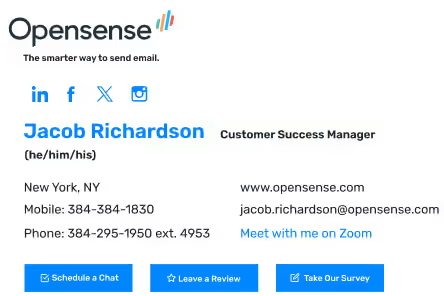
Fits the viewport
Opensense deploys the HTML you saved, exactly as you saved it. Nothing rewrites a two-column template into one column at send time, so if a mockup only works at 700 pixels wide, the fix happens in the template, not in the deployment.
Test the clients your company actually uses
After optimizing your template, verify it the same way you audited your original email signatures: send another test to each of the email clients your organization uses.
Gmail mobile strips CSS and proxies images, Outlook on the web is not the same as Outlook desktop, and Outlook Mobile behaves differently on iOS and Android. After every template change, do a test send and check light and dark mode, plus the images-off state, where the alt text, name, and phone number should still appear for the recipient.
You can use Opensense’s Designer Studio as a sandbox for your email signature templates. Its preview, including Dark Mode Preview, is still not a substitute for opening the delivered message on a phone.
Remember to retest quarterly, as client apps update frequently.
Deploy the template so every phone sends the same one
All your hard work from the steps above can still fail if employees own local signatures. Finalize your signature template, map and secure email signature fields from Entra ID or Google Directory, and deploy it.
 Opensense applies the signature
The phone carries nothing
The phone carries the add-in
Most organizations finish their first deploy with Opensense in about 45 minutes. Moving forward, a logo change is one template edit, and directory changes follow automatically on a sync cycle.
Server-side deployment does not make Gmail render like Outlook; it makes sure Gmail and Outlook receive the same locked HTML instead of multiple local configurations.
See how to deploy signatures Outlook cannot override
Start with the phone in your pocket
Send yourself an email from your work account to your personal account, and open it on your phone. If your email signature’s logo is squashed or the template block scrolls sideways, you already have the audit result.
Opensense can help you build that template, govern it, and deploy it to every mailbox in your organization.